

Studying, freelancing, and managing everyday life can turn one laptop into a crowded workspace. One tab holds a research paper, another has a client brief, and somewhere in the background an unpaid invoice is quietly aging. Sound familiar?
California Community Colleges serve about 2.2 million students across 116 colleges, so the demand for flexible study and career tools is enormous. But which apps actually save time, and which ones simply create another dashboard to maintain?
This guide covers the best online tools for California students and freelancers, including options for research, writing, project management, design, scheduling, time tracking, invoicing, and California-specific administration.
Here’s What’s Inside
The most useful toolkit should help you:
- Organize assignments, deadlines, and client work
- Create professional documents and visuals
- Check writing, citations, and originality
- Track billable hours and send invoices
- Reduce scheduling back-and-forth
- Maintain cleaner financial records
Start with the problems you face every week. A simple tool used consistently is more valuable than an advanced platform abandoned after three days.
Google Workspace – Best for Everyday Collaboration

Google Drive, Docs, Sheets, and Slides remain practical because most students, instructors, and clients already know them. You can share a file as a viewer, commenter, or editor, making group projects and approvals easier to control.
Google also supports offline access for recent Docs, Sheets, and Slides files, which is useful when Wi-Fi is unreliable.
Use it for:
- Collaborative assignments and notes
- Client proposals and content calendars
- Budget tracking
- Presentations and feedback
Before sharing, check permissions. A public link can expose information you intended to keep private.
Notion – Best for Managing Projects and Deadlines
Notion works well when responsibilities are spread across classes, clients, applications, and personal goals. Its databases can display the same information as a table, board, timeline, calendar, list, or gallery.
A student might create views for assignments due this week, long-term projects, and exams. A freelancer can track leads, deliverables, invoice status, and follow-up dates.
Here’s the thing: do not spend hours designing the perfect dashboard. Begin with four fields: task, deadline, status, and next action. Add complexity only when it solves a real problem.
ZeroGPT and Grammarly – Best for Writing Checks

Students and freelancers increasingly work with AI-assisted drafts, edited source material, and collaborative documents. An AI text detector can provide an additional review when you want to examine whether a passage may appear machine-generated.
However, detector scores are signals, not proof. False positives are possible, so academic decisions should never rely on one automated result.
Grammarly can help with grammar, tone, citations, and plagiarism checks, while its Authorship feature records how text was created or revised rather than simply guessing after submission.
These tools still require human judgment. For example, a freelancer writing for a property-services client should present deep cleaning as restorative work that resets tile and grout, improves appearance, reduces complaints, and delays replacement costs. A checker may polish the wording, but it cannot replace accurate positioning.
Zotero – Best for Research and Citations
Zotero is one of the strongest free online tools for students who regularly work with academic sources. It helps users collect, organize, annotate, cite, and share research, while its browser connector saves sources with a click.
Create a separate collection for each course or client project. Add notes explaining why each source matters instead of saving dozens of links you never revisit.
Always review generated citations. Author names, capitalization, dates, and page numbers may still need correction.
Canva – Best for Presentations and Visual Content
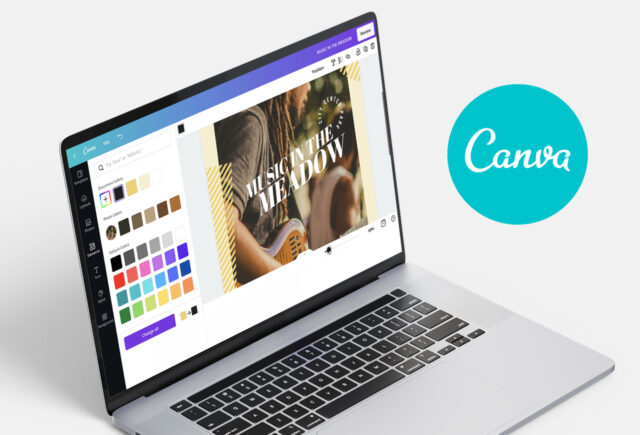
Canva is useful for presentations, social posts, resumes, portfolios, infographics, and simple client graphics. College students can use Canva Free, while some institutions provide premium access through Canva for Campus.
Templates make design faster, but they can also make work look generic. Change the typography, spacing, imagery, and layout so the final piece fits the assignment or client brand.
Check:
- Whether your school offers campus access
- Export format and image quality
- Commercial-use rules for assets
- Readability and accessibility
Good design supports the message. It should not compete with it.
Toggl Track – Best for Understanding Where Time Goes
Freelancers often underprice work because they remember production time but forget research, calls, revisions, and administration. Toggl Track lets users record billable and non-billable time through web, mobile, desktop, browser extensions, or manual entries.
Students can use it for a one-week study audit. You may discover that a “three-hour assignment” contains only 70 minutes of focused work.
Track broad categories such as research, production, meetings, revisions, admin, and study. The goal is better estimates, not constant self-surveillance.
Calendly – Best for Easier Meeting Scheduling
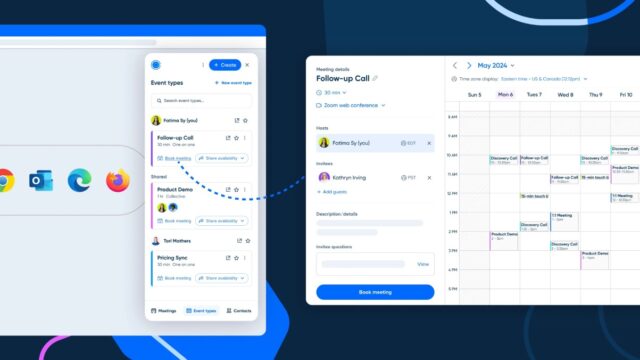
Calendly removes the repeated “What time works for you?” exchange by letting others choose from available slots. It is useful for tutoring, portfolio reviews, discovery calls, interviews, and client meetings.
Freelancers can connect scheduling with payment collection in supported setups, which may reduce no-shows for consultations.
Protect your calendar with buffers. Do not make every open minute bookable. Add preparation time before important calls and a short gap afterward for notes or follow-ups.
Wave – Best for Invoicing and Financial Organization
A polished invoice confirms what was delivered, what the client owes, when payment is due, and how it can be made.
Wave combines invoicing, payments, accounting, and reporting tools for small businesses and independent workers. It can be a practical starting point for freelancers who have outgrown improvised invoices.
Every invoice should include:
- Your business and client details
- A clear service description
- Invoice date and unique number
- Payment deadline
- Rate, total, and payment method
Review fees and feature limits before choosing any payment platform.
California FTB and Labor Portals – Best for Staying Compliant

The best online tools for California freelancers are not all commercial apps. The California Franchise Tax Board states that self-employed individuals must report business income or losses and may need to pay estimated taxes quarterly.
The state’s Labor and Workforce Development Agency also explains the ABC test used in many worker-classification situations. A worker is presumed to be an employee unless the hiring entity satisfies all three conditions.
Bookmark these resources and keep organized records of income, expenses, contracts, and payments. Software can assist with administration, but it cannot determine your legal classification or replace tailored tax advice.
A Simpler Toolkit Is Usually Better
The best online tools for California students and freelancers should reduce friction, not create digital clutter. Choose tools that match the work you already do and make deadlines, communication, and payments easier to manage.
Start with one or two changes. Set up a weekly task board, organize your research library, or create a professional invoice template. Once that habit works, add the next tool.
Small systems become reliable workflows.